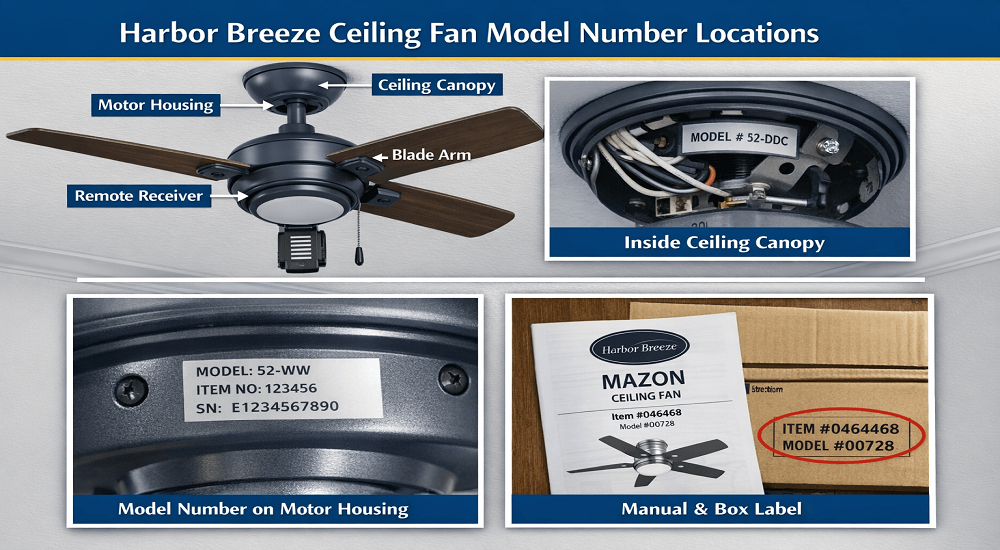

Finding your harbor breeze ceiling fan model number is the most critical step in successfully ordering replacement parts, downloading the correct PDF manual, or troubleshooting a technical fault. Without this specific identifier, you risk purchasing incompatible remotes or blades that simply will not fit your specific motor housing.
Harbor Breeze Ceiling Fan Model Number Locations
| Location on the Fan | What to Look For | Difficulty Level | Notes |
| Motor Housing (Bottom or Side) | Sticker or metal label with model number (e.g. 52-xxx or item number) | Easy | Most common location on Harbor Breeze fans |
| Inside Ceiling Canopy | Label near mounting bracket or wiring | Medium | Turn power OFF before checking |
| Blade Iron / Blade Arm | Small stamped or printed code | Hard | Not present on all models |
| Remote Receiver or Switch Housing | Receiver label with model or FCC ID | Medium | Useful when fan won’t turn on |
| Original Manual or Box | Printed model number and item number | Easy | Best option if you still have it |
| Purchase Receipt / Order History | Item number linked to model | Easy | Useful for online purchases |
Where to find Harbor Breeze ceiling fan model number?
To find your harbor breeze ceiling fan model number, look for a silver or white sticker located on the top of the motor housing (facing the ceiling), inside the decorative ceiling canopy, or on the original packaging and manual. The number usually begins with a series of letters followed by digits, such as L05BN or HKW-52.
Harbor Breeze Model Number Location Guide
Because Harbor Breeze is a private-label brand, they do not stamp the model number on the front of the fan for aesthetic reasons. You will need to check these five specific locations:
1. The Top of the Motor Housing (Most Common)
The most likely harbor breeze model number location is on a small silver or white sticker on the flat top surface of the motor.
- How to see it: Use a small mirror or your phone’s camera on a selfie setting to peek at the top of the fan without taking it down.
- What to look for: Look for “Model No.” or “MOD.” followed by a string of characters.
2. Inside the Ceiling Canopy
If it isn’t on the motor, it is often hidden behind the canopy—the bowl-shaped piece that covers the wiring at the ceiling.
- Safety Note: Always turn off the power at the circuit breaker before loosening the canopy screws to avoid electrical shock.
- Expert Tip: Slide the canopy down the downrod to reveal the mounting bracket; the sticker is often placed on the bracket or the interior wall of the canopy.
3. The Blade Irons (Arms)
On some decorative or older models, the model or item number is stamped into the metal of the blade arm (the part that connects the blade to the motor). This is often on the side of the arm that faces the ceiling, requiring you to unscrew one blade to view it clearly.
4. Packaging, Receipts, or the Original Manual
If you still have the box or the paper manual, the model number is always prominently displayed on the front cover.
- Item Number vs. Model Number: Note that Lowe’s often uses an “Item Number” (6-7 digits) which is different from the manufacturer “Model Number.” Both are helpful for support.
5. Remote Control and Switch Housing
For fans that include a factory remote, check the battery compartment. While this usually shows the remote’s model number, it can sometimes lead you to the compatible fan series.
What model is my Harbor Breeze fan? Identification by Feature
If the sticker has fallen off or is unreadable, you can still identify “what model is my harbor breeze fan” by documenting these specific traits:
- Blade Span: Measure from the tip of one blade to the center of the fan and multiply by two (e.g., 52 inches).
- Light Kit Style: Is it a 3-light cluster, a single globe, or an integrated LED?
- Finish: Is it Brushed Nickel, Oil-Rubbed Bronze, or White?
- Blade Shape: Are the blades traditional, or uniquely sculpted like the Harbor Breeze Avian Ceiling Fan Model L05BN Manual?
How to Use Your Model Number for Parts and Manuals
Once you have identified the number, you can take the following actions:
- Download Manuals: Visit the official Lowe’s website or specialized archives like Harbor Breeze Ceiling Fan Manuals.
- Order Parts: Search by model number on sites like RepairClinic or eReplacementParts for specific capacitors, blades, or light globes.
- Contact Support: Call Harbor Breeze customer service at 1-800-643-0067 with the model number ready for faster service.
Frequently Asked Questions (FAQ)
What if the model number isn’t on the fan?
If the sticker is missing, take a clear photo of the fan and use “Google Lens” or a reverse image search. This will often find retail listings or forum posts identifying the exact model by its appearance.
Can I use the item number instead?
Yes. Since Harbor Breeze is a Lowe’s brand, the Item Number found on your receipt or the box is often more useful for their internal database than the manufacturer’s model number.
How to look up Harbor Breeze model by description?
Search for specific keywords like “Harbor Breeze 52-inch Brushed Nickel 3-light fan.” Browse the image results until you find a match. Pay close attention to the blade arm shape, as this is often the most unique identifier between models.